The only AI tool I use — and how it reaches Figma, GitHub and Vercel
Every list of AI tools for designers has fifteen entries. Mine has one. I use Claude, and I connect it to the tools I already work in rather than adding more tools beside it. That is not minimalism — it is what happens when you optimise for one thing: staying able to tell whether the output is right.
How many AI tools does a product designer need?
Fewer than the listicles suggest. Most of those roundups compare products that do the same job — generate an interface from a prompt — and the comparison never gets to the part that matters, which is what happens on the fifth iteration, when the thing is half-built and somebody has to decide whether to keep going.
Collecting tools also has a hidden cost. Each one has its own context, its own memory of your project, and its own idea of what you are building. Five tools means five partial pictures and a designer doing the integration by hand. One tool that can reach into the others means one picture.
Which AI tool do I actually use?
Claude, in three forms, chosen by how much of the work needs to touch real files.
- Claude Code for anything that changes a project: writing and editing files, running commands, checking the result in a browser. This site's blog and its Turkish version were both built this way.
- claude.ai in the browser for thinking out loud — synthesis, structure, copy, arguing with a direction before it costs anything.
- The desktop app for the same, closer to hand.
I also use whatever AI is embedded in the tools I already work in, when it is genuinely the shortest path. What I do not do is add a second general-purpose assistant.
I did not start here. This site was originally built with OpenAI's Codex, and I still reach for ChatGPT when the work is analysis or writing rather than files. I wrote about that switch separately.
How is one tool connected to Figma, GitHub and Vercel?
Through MCP — the Model Context Protocol, an open standard that lets an AI assistant connect to external tools and data sources through one common interface. In practice it turns an assistant from something you paste into, to something that can act in the systems you already use.
My setup is small and boring, which is the point:
- Figma and Sketch over MCP, so design work and the conversation about it share one context instead of being screenshotted back and forth.
- GitHub, so changes land as real commits on a branch with a message that explains them, not as files copied into place.
- Vercel, so a branch becomes a preview deployment I can open on a phone before anything reaches production.
The result is that publishing is not a separate manual chore at the end. I describe a change, it becomes a commit, the commit becomes a preview, and I look at the preview. The whole path is one conversation with one context.
What does this look like on a real project?
Two, both real, both with the mistakes included.
This site. A hand-written static site — no framework, no build step. The blog, its Turkish counterpart and the search work on top of them were built in this loop: change, commit, preview, look at it on a phone, fix what is wrong. The useful detail is not the speed. It is that every step was verifiable, so when something rendered wrong I could see it rather than take somebody's word for it.
A multi-package mobile product. A prototype I am building on my own: a React Native app in Expo, a Next.js panel, and shared packages for the design system, types and validation. It runs on fixture data and is not a launched product. What matters here is not what it does — it is that the work spans four packages that have to stay consistent with each other, and that a change in one of them is usually a change in three. One person can hold that in their head when the tool can see the whole repository. One person cannot when the tool only sees a pasted file. That difference is the entire argument for connecting the assistant to the project rather than chatting beside it.
If I cannot say why the output is right, I have not designed anything. I have only approved something.
Where does it stop being useful?
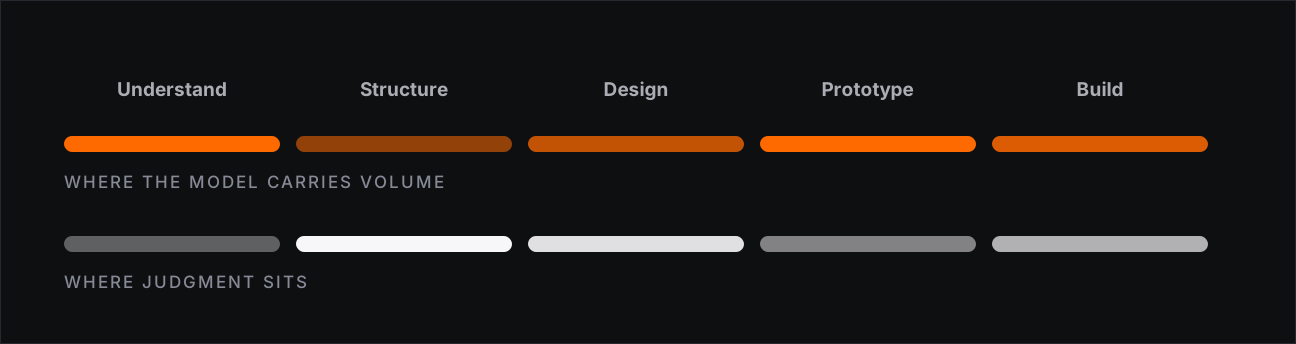
Wherever I could not check the answer. That is the whole boundary, and it is worth being blunt about it.
Problem selection stays with me. A model can rank options against a criterion; it cannot tell me the criterion is wrong, because it has not met the users, has not lost the customer who churned, and was not in the meeting where the real constraint was mentioned once and never written down.
Trade-offs stay with me, because every interesting design decision costs something and choosing what to spend is the job. So does the closing call: somebody has to be accountable for what ships, and "the model produced it" has never been an answer anyone accepts.
There is also a failure mode worth naming. Generated work is confident in exactly the places it is weakest — a flow with real domain rules comes back plausible and wrong, which is more dangerous than coming back obviously broken.
The test I use before handing anything over
One question: if this comes back wrong, will I be able to tell?
Where the answer is yes — a flow I know cold, markup I can read, copy I can hear — the tool saves real time. Where the answer is no, speed is not a saving; it is a way of being wrong sooner and with more confidence. That test has nothing to do with which product is open on my screen, which is why the tools keep changing and the division of labour does not.